We Turn Your Plays Into LCK & LCS Broadcasts! (BETA)
Upload a clip to Discord, and AI handles the rest.
What It Does
Upload a game clip to Discord with /highlight, and AI automatically analyzes the match data and overlays real LCK/Worlds-style broadcast graphics on it - a scoreboard, player info, items/runes/summoner spells, and the gold gap, all synced precisely to that moment. Then it adds AI voice narration that describes the play like a professional caster, turning it into a finished highlight video.
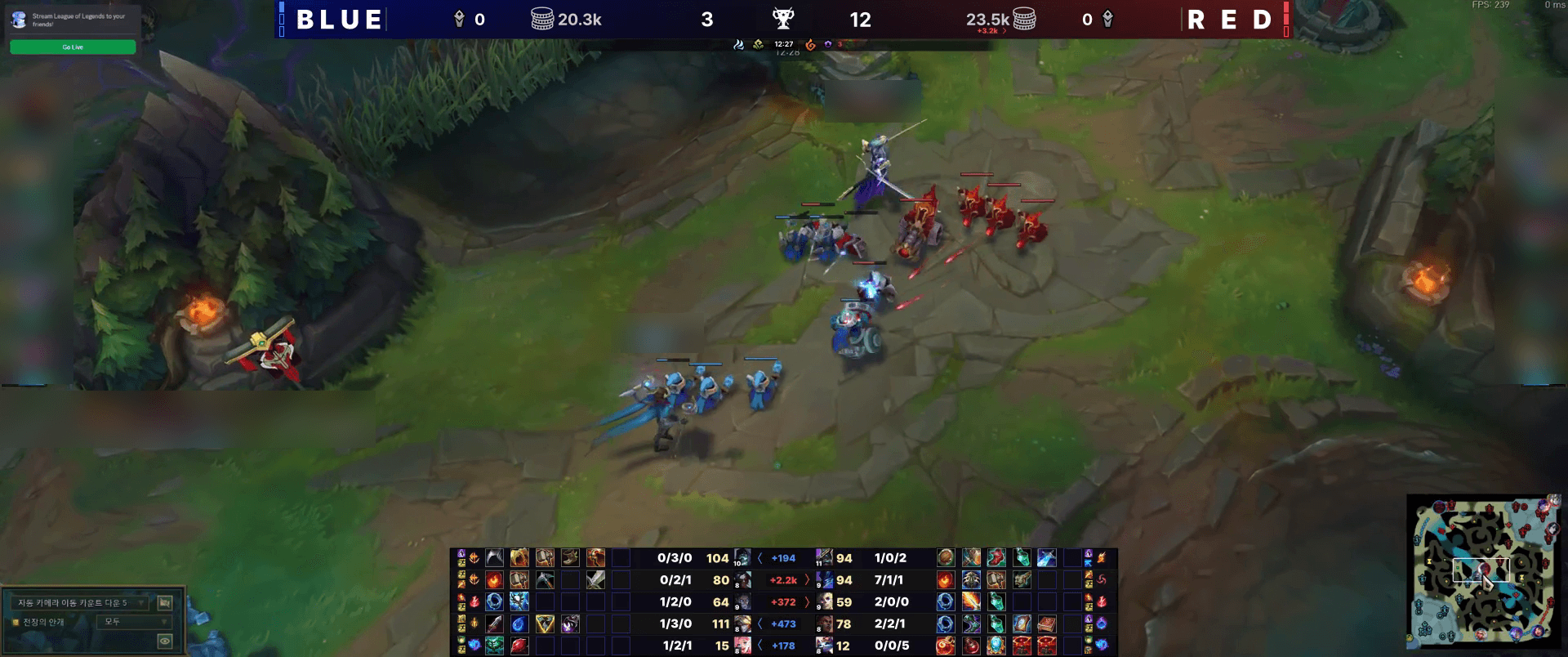
Here's what it actually looks like
Before You Try It
⚠️ Keep This in Mind
If a clip has multiple kills in a row (double kill, triple kill, etc.), they'll all be included in one highlight together. Just keep the recording short enough to avoid unrelated moments. It only works for games that get saved to your match history, like normal and ranked games. Custom games, practice tool, and Co-op vs. AI modes aren't supported. If the kill happens right at the start of your clip, it might jump straight into the action without any buildup. Try to record a few seconds before the kill too.
📹 Recording Tips
Keep your clip under 45 seconds - just the moment you want to show off. Record in landscape (portrait isn't supported), and make sure the in-game clock is visible on screen. Both regular gameplay footage and replay-viewer recordings work fine. If you're using a recording tool like Medal.tv, try to upload the clip soon after recording instead of letting it sit for a while. 💡 Tip: Recording from a wider, spectator-style view instead of your own POV can help give your highlight more of a tournament feel!
🌍 Switching to English
It's not just a translation - Korean uses an LCK-style broadcast tone, and English uses an LCS-style one. When you run /highlight, the style option lets you pick either one for just that clip - leave it out and it follows the server's default setting.
🔑 Before You Start
Once you use it, you'll need to wait 30 seconds before using it again. You can create up to 5 a day per person, and 30 a day per server. Video files can't be over 100MB. You'll also need your server's region set up and your own account verified before your first try.
See setup steps in the guide →This is still an early beta, so there's a lot we're still polishing. The voice tone might not always land perfectly, timing can be a little off, and honestly, there are technical limits that make matching a real broadcast tricky for now. We're working on closing that gap over time, so feel free to give it a try and send us your bugs or feedback. It really helps. Thanks for bearing with us! 🙏
Try It Now
We'll keep improving this feature and plan to support more games down the road. Stay tuned!